Multi-module programming. (asm + C)
Theory
Working with multi-module programms, regardless of the programming language of each module, it is assumed that one of the modules calls a subprogram from a different module. We assume that one of the modules is written in assembly language, and the other one in a high level programming language.
Motivation: high execution speed in solving tasks with minimal resource consumption.
Call code
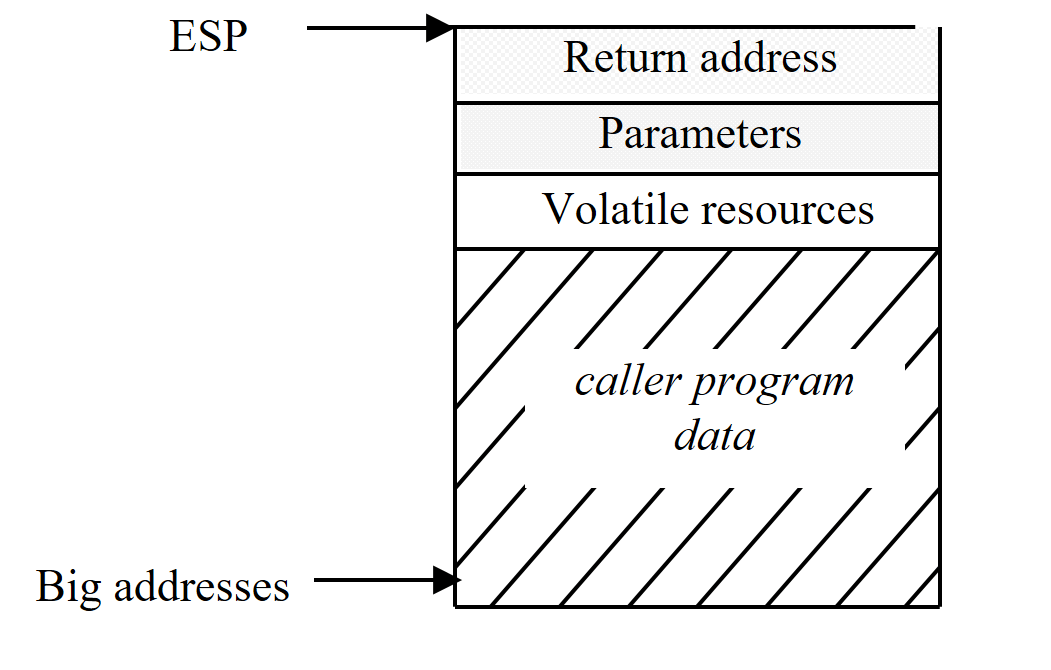
Entry code
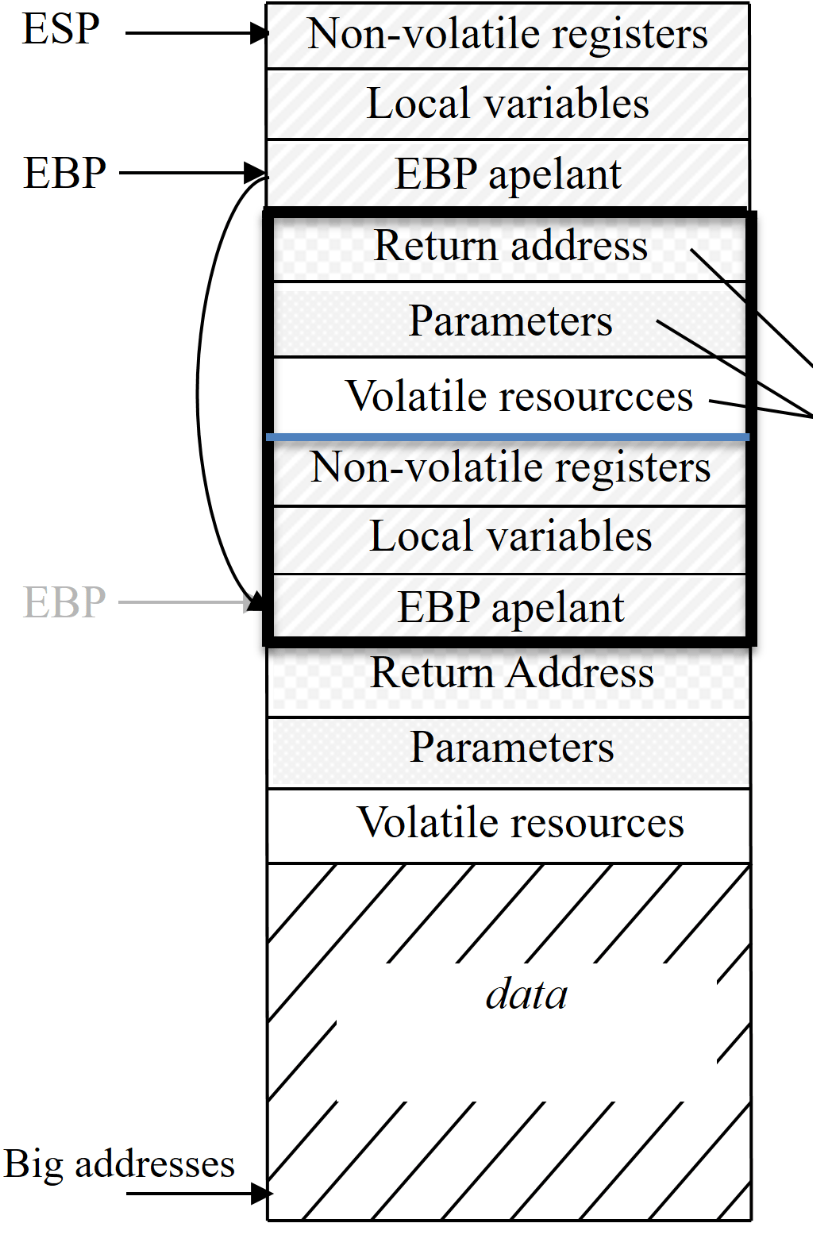
Return code
- Restoring nonvolatile altered resources;
- Removing local variables of the function;
- Destroying the stack frame;
- Returning to the calling code and removing the parameters.
Except for the volatile resources and direct results of the function, the status of the program after these steps must reflect the initial, pre-call state.
Declaring external symbols:
In order to access a function written in assembly language from a C program, the function needs to be declared as global in the assembly program and needs to contain the character ‘_’ in front of the function name.
If the function will be called from the C program as
fun()
then the asm program will contain the following code:
global _fun
segment code public code use32
_fun:
...
Keeping the value of some registers unchanged
High level languages require that certain registers have the same value after a function call as before the function call. For this purpose, if the subprogram defined in assembly language changes some of these registers, then their values at the entry point need to be stored (for example on the stack). These values will be restored before returning from the procedure.
PUSHAD and POPAD can be used for storing and restoring the values of the 8 general registers.
Passing parameters to the function
Parameters are passed using the stack, which offers a greater flexibility than passing parameters using registers (regarding the number of parameters).
Creating the stack frame
When entering the function we set the register EBP←ESP. Before exiting the function we will restore this value. Because ESP changes when we push parameters on the stack, the best way to acces the values of the parameters is using a base or an index register. For this purpose EBP is more suitable, because when we use it we automatically refer to the stack segment. The sequence that prepares the stack access is:
push ebp
mov ebp, esp
Reserving memory space for local defined data
Sometimes the procedure needs local data. If their value does not need to be stored between two consecutive function calls, then these are volatile data and they will be stored on the stack. Otherwise, these are static data and they will be stored in a different segment from the stack segment, for instance in the data segment. Reserving n bytes (n being a multiple of 4) for local data can be done relative to EBP.
sub esp,n
Hence:
- the EBP register will be used to acces parameters (for example
[EBP+8]accesses the first parameter represented on 32 bits); - the first parameter accessible from the stack is the last parameter added on the stack by the caller program;
- we reserve space on the stack for local variables, for example:
sub esp, 4*1
- this method simplifies the way of accessing parameters, especially for functions with a variable number of parameters;
- it is the responsibility of the programer to pop the parameters out of the stack.
Returning values from a function
- if the function returns an integer, then this will be returned in EAX;
- if the function returns a string, then its address will be returned in EAX;
- using the CDECL convention, it is assumed the the registers EBX, ESI, EDI, EBP and ESP do not modify their value during the function call.
Returning from a procedure
When returning from the procedure the following steps are necessary:
- restoring values previously saved into some registers;
- restoring the stack so that it contains the return address on top:
mov esp,ebp
pop ebp
Structure of a function:
global _fun
segment code public code use32
_fun:
        push ebp
        mov ebp, esp
        pushad
        ;... code of the function ...
        popad
        mov eax, returned_value
        mov esp, ebp
        pop ebp
        end
Using procedures defined in assembly within a C program
Example 1
In an assembly program we define a procedure called hello_world that does not have any parameters and does not return anything. The procedure prints the message “Hello World!” on the screen.
hello_world.asm
bits 32
extern _printf
global _hello_world
segment data public data use32
	mesaj db 'Hello world!', 0
segment code public code use32
_hello_world:
	push ebp
	mov ebp,esp
	push dword mesaj
	call _printf
	add esp, 4*1
	pop ebp
    ret
hello_world.c
#include <stdio.h>

void hello_world();

int main()
{
	hello_world();
	printf("This program just prints something on the screen!");
	return 0;

}
Observe the keyword extern, which tells the compiler that the function / variable is defined in a different file (not in the current file). It is the linker’s job to create a conexion between this declaration of the function / variable and its definition.
Example 2
In an assembly program we define a procedure called return_10, which does not have any parameters and it returns an integer.
return_10.asm
bits 32
global _return_10
segment data public data use32
segment code public code use32
_return_10:
	mov eax, 10
	ret
return_10.c
#include <stdio.h>
int return_10();
int main()
{
	printf("The program returns the value %d!",return_10());
	return 0;
}
Example 3
In an assembly program we define a procedure called sum which has two integer parameters and returns their sum (an integer).
sum.asm
bits 32
global _sum
segment data public data use32
segment code public code use32
_sum:
	push ebp
	mov ebp, esp
	mov eax, [ebp+8]
	add eax, [ebp+12]
	mov esp, ebp
	pop ebp
    ret
sum.c
#include <stdio.h>

int sum(int, int);

int main()
{

	printf("%d\n", sum(2, 3));
	return 0;

}
Example 4
In an assembly program we define a procedure called factorial which has a positive integer as parameter and returns its factorial (a positive integer).
factorial.asm
bits 32
global _factorial
segment data public data use32
segment code public code use32
_factorial:
	push ebp
	mov ebp,esp
	sub esp, 4
	mov eax, [ebp+8]
	cmp eax,2
	jbe   .trivial
	.recursiv:
		dec  eax
		push eax
		call _factorial
		add  esp, 4
		mov  [ebp-4], eax   ; m = (n-1)!
		mov  eax, [ebp+8]   ; n
		mul  dword [ebp-4]  ; edx:eax ← n * m
		jmp  .final
	.trivial:
		xor  edx, edx
	.final:
	add esp, 4
    mov esp, ebp
    pop ebp
    ret
factorial.c
#include <stdio.h>

int factorial(int);

int main()
{
	int n, f;
	printf("n = ");
	scanf("%d", &n);

	f = factorial(n);

	printf("factorial(%d) = %d\n", n, f);

	return 0;
}
Multi-module programming (asm+C) in Visual Studio
The following tutorial is based on Visual Studio 2015, it is assumed that you have a version of Visual Studio installed on your computer.
The following example shows how to compile, run and debug the program from the Example section.
We use the command line for compiling/assembling the modules. The steps used for compiling the main.c program are:
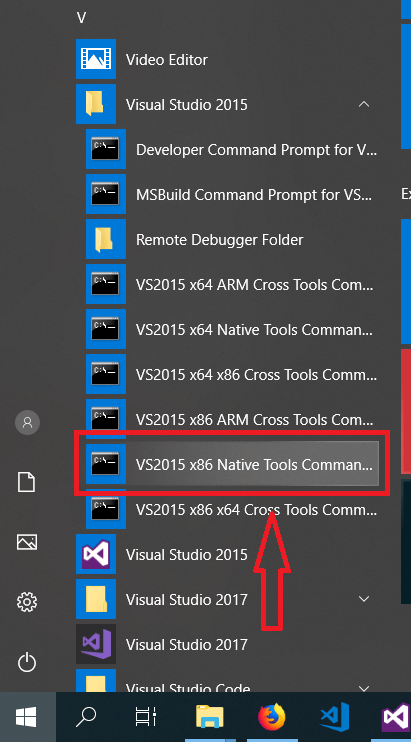
- Open the Visual Studio command line, for this navigate in the Windows Start menu at Visual Studio and choose the option VS2015 x86 Native Tools Command Prompt, as in the figure below.
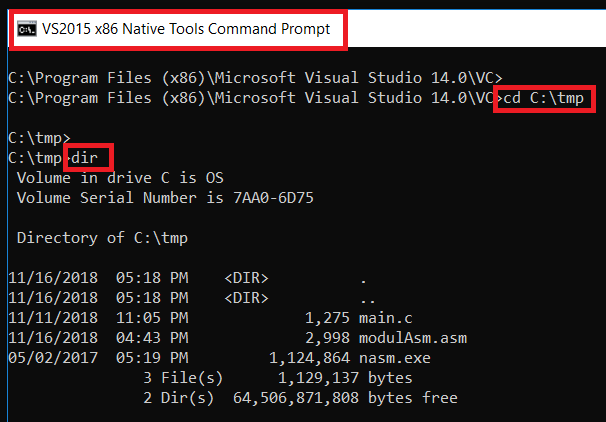
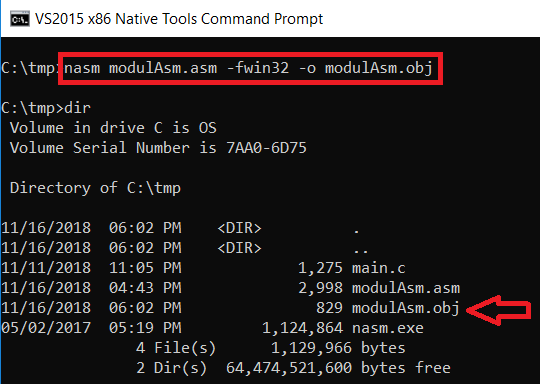
- In the terminal window navigate to the directory where the program sources are located. In the following example the sources are in the tmp folder, the dir command lists the content of the current directory. Besides the source files of the program, in the tmp directory we also have the executable nasm.exe used for assembling
modulAsm.asm.
- In the first step we assembly
modulAsm.asmusing the command:
nasm modulAsm.asm -fwin32 -o modulAsm.obj
The result is the file modulAsm.obj (see the figure below).
- Using the Visual Studio compiler (
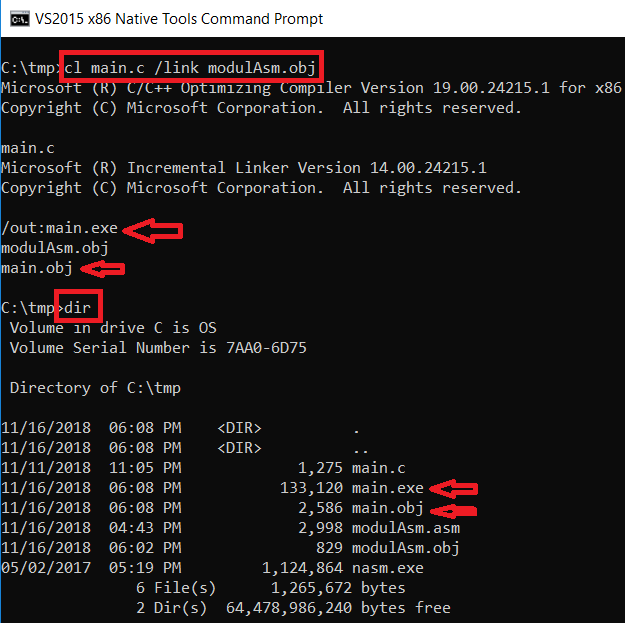
cl.exe) we compilemain.c. This step must include link editing -> we use the parameter /linker with the filemodulAsm.obj. The result is the programmain.exe.
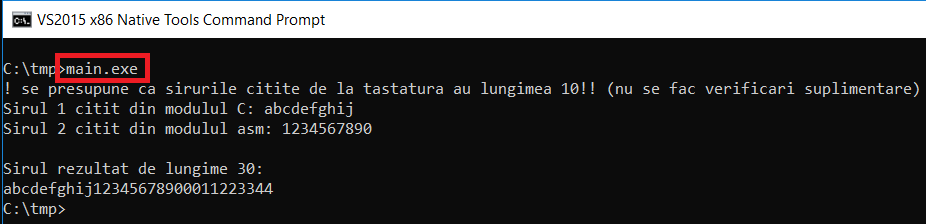
- The program can be executed from command line using
main.exe:
- We can debug the program using Ollydbg, but in order to do this we must specify it in the assembly/compile step:
> nasm modulAsm.asm -fwin32 -g -o modulAsm.obj

> cl /Z7 main.c /link modulAsm.obj
- From Ollydbg, File -> Open we open main.exe.
- In Visual C if we wish to include debugging information the options are /Z{7|i|I} (see https://msdn.microsoft.com/en-us/library/958x11bc.aspx) .
Example 1 - concatenate strings (asm+C)
Write a C/C++ program which calls the asmConcat function written in assembly language. This function has as parameter a character string read in the C/C++ program, reads another character string using the readString C/C++ function, and accesses an additional character string which is a global variable of the C/C++ program (called stringC). The function asmConcat builds and returns as a result the string obtained by concatenating the first 10 characters of each of the 3 strings. This string will be printed on the screen.
C file: mainConcatenate.c
/*++
  Write a C/C++ program which calls the <strong>asmConcat</strong> function written in assembly language.
  This function has as parameter a character string read in the C/C++ program, reads another character string using the <strong>readString</strong> C/C++ function, and accesses an additional character string which is a global variable of the C/C++ program (called <strong> stringC </strong>).
  The function <strong>asmConcat</strong> builds and returns as a result the string obtained by concatenating the first 10 characters of each of the 3 strings.
  This string will be printed on the screen.
 --*/


#include <stdio.h>

// the function declared in modulConcatenate.asm
int asmConcat(char sir[], char sirR[]);

// the function used for reading a string from keyboard
void readString(char sir[]);

// global string accessed from asmConcat
char str3[] = "0011223344";

int main()
{
    char str1[11];
    char strRez[31] = "";
    int lenStrRez = 0;

    printf("! we assume that the strings read from keyboard contain 10 characters!! (we do not validate)\n");
    printf("String 1 read from the C module: ");
    readString(str1);

    lenStrRez = asmConcat(str1, strRez);
    printf("\nResult string of length %d:\n%s", lenStrRez, strRez);
    return 0;
}

void readString(char sir[])
{
    scanf("%s", sir);
}
asm file: moduleConcatenate.asm
bits 32
; informing the assembler of the exitence of the function _readString and the variable _str3
extern _readString
extern _str3
; in Windows, the nasm directive import can be used only for obj files!! we will create a win32 file, the printf function will be imported as follows (according to the NASM documentation)
extern _printf
; informing the assembler that we want to make the _asmConcat function available for other modules
global _asmConcat
; the linkeditor can use the public data segment also for data from outside
segment data public data use32
    lenRez                dd        0
    resultStringAddress   dd        0
    paramStringAddress    dd        0
    readStringAddress     dd        0
    message               db        "String 2 read from the asm module: ", 0
; the assembly code is included in segment public, possible to be shared with another extern code
segment code public code use32
; int asmConcat(char[], char[])
; stdcall convention
_asmConcat:
    ; creating a stack frame for the called program
    push ebp
    mov ebp, esp

    ; reserving space on the stack for local variables
    sub esp, 4 * 3                    ; reserving 4*3 bytes on the stack for the string read from keyboard
    ; arguments passed to the asmConcat function using the stack
	; at the location [ebp+4] we have the return address (the value of EIP at the moment of the call)
    ; at the location [ebp] we have the value of ebp for the caller
    mov eax, [ebp + 8]
    mov [paramStringAddress], eax
    mov eax, [ebp + 12]
    mov [resultStringAddress], eax
    ; store the address of the string that is read
    mov [readStringAddress], ebp
    sub dword [readStringAddress], 4*3

    ; call the readString C function in order to read string 2
    push dword message
    call _printf
    add esp, 4*1
    push dword [readStringAddress]
    call _readString
    add esp, 4*1
    ; concatenate the strings
    ; copy the string passed as parameter to the asmConcat function (string1) in the result string
    cld
    mov edi, [resultStringAddress]
    mov esi, [paramStringAddress]
    mov ecx, 10
    rep movsb
    ; copy the string read using the readString function in the result string
    add dword [lenRez], 10
    mov esi, [readStringAddress]
    mov ecx, 10
    rep movsb
    ; copy the string from the global variable from the C program in the result string
    add dword [lenRez], 10
    mov esi, _str3
    mov ecx, 10
    rep movsb
    add dword [lenRez], 10

    ; delete the space reserved on the stack
    ; !! we did not store the values of the registers before executing _asmConcat, if we wishh to do that we can use the instruction PUSHAD and restore them using POPAD
	add esp, 4 * 3
    ; restore the stack frame for the caller program
    mov esp, ebp
    pop ebp
    ; the two instruction which restore the stack frame can be replaced with the instruction leave
    ; return the length of the obtained string as a result in eax
    mov eax, [lenRez]
    ret
    ; stdcall convention - it is the responsibility of the caller program to free the parameters of the function from the stack
Example 2 - sum nubers (asm + C)
Write a C program that calls the function sumNumbers, written in assembly language. This functions receives as parameters two integer numbers that were read in the C program, computes their sum and returns this value. The C program will display the sum computed by the sumNumbers function.
C file: mainSumaNumere.c
/*++
Write a C program that calls the function sumNumbers, written in assembly language. This functions receives
as parameters two integer numbers that were read in the C program, computes their sum and returns this value.
The C program will display the sum computed by the sumNumbers function.
--*/


#include <stdio.h>

// the function declased in the en_modulSumaNumere.asm file
int sumaNumere(int a, int b);

int main()
{
    // declare variables
    int a = 0;
    int b = 0;
    int sum = 0;

    // read the two integers from the keyboard
    printf("a=");
    scanf("%d", &a);

    printf("b=");
    scanf("%d", &b);

    // call the function written in assembly language
    sum = sumaNumere(a, b);

    // display the result
    printf("Suma numerelor este %d", sum);

    return 0;
}
asm file: modulSumaNumere.asm
bits 32

; indicate to the assembler that the function _sumNumbers should be available to other compile units
global _sumNumbers

; the linker may use the public data segment for external datta
segment data public data use32

; the code written in assembly language resides in a public segment, that may be shared with external code
segment code public code use32

; int sumNumbers(int, int)
; cdecl call convention
_sumNumbers:
    ; create a stack frame
    push ebp
    mov ebp, esp

    ; retreive the function's arguments from the stack
    ; [ebp+4] contains the return value
    ; [ebp] contains the ebp value for the caller
    mov eax, [ebp + 8]        ; eax <- a

    mov ebx, [ebp + 12]        ; ebx <- b

    add eax, ebx            ; compute the sum
                            ; the return value of the function should be in EAX

    ; restore the stack frame
    mov esp, ebp
    pop ebp

    ret
    ; cdecl call convention - the caller will remove the parameters from the stack
Exercices
For the next problems, at least one subprogram should be implemented in a separated asm module and the main module should be implemented in C:
- An unsigned number a on 32 bits is given. Print the hexadecimal representation of a, but also the results of the circular permutations of its hex digits.
- Read from the keyboard a string of numbers, given in the base 10 as signed numbers (a string of characters is read from the keyboard and a string of numbers must be stored in the memory).
- Two strings containing characters are given. Calculate and display the result of the concatenation of all characters of type decimal number from the second string, and then followed by those from the first string, and vice versa, the result of concatenating the characters from the first string after those from the second string.
- A string of numbers is given. Show the values in base 16 and base 2.
- Read the signed numbers a, b and c on type byte; calculate and display a+b-c.
- Three strings (of characters) are read from the keyboard. Identify and display the result of their concatenation.
- Three strings (of characters) are given. Show the longest prefix for each of the three pairs of two strings that can be formed.
- Show for each number from 32 to 126 the value of the number (in base 8) and the character with that ASCII code.
- Read from the keyboard a string of numbers, given in the base 16 (a string of characters is read from the keyboard and a string of numbers must be stored in memory). Show the decimal value of the number both as unsigned and signed numbers.
- Multiple strings of characters are being read. Determine whether the first appears as a subsequence in each of the others and give an appropriate message.
- Multiple numbers in base 2 are read from the keyboard. Display these numbers in the base 16.
- Two strings of characters of equal length are given. Calculate and display the results of the interleaving of the letters, for the two possible interlaces (the letters of the first string in an even position, respectively the letters from the first string in an odd positions). Where no character exist in the source string, the ‘ ’ character will replace it in the destination string.
- Three strings of characters are given. Show the longest common suffix for each of the three pairs of two strings that can be formed
- Multiple numbers in base 2 are read from the keyboard. Display these numbers in the base 8.
- Read an integer (positive number) n from keyboard. Then read n sentences containing at least n words (no validation needed).
Print the string containing the concatenation of the word i of the sentence i, for i=1,n (separated by a space).
Example: n=5
We read the following 5 sentences:
We read the following 5 sentences.
Today is monday and it is raining.
My favorite book is the one I just showed you.
It is pretty cold today.
Tomorrow I am going shopping.
The string printed on the screen should be:
We is book cold shopping. - A string containing n binary representations on 8 bits is given as a character string.
Obtain the string containing the numbers corresponding to the given binary representations.
Example:
Given: '10100111b', '01100011b', '110b', '101011b'
Obtain: 10100111b, 01100011b, 110b, 101011b - Read a string of unsigned numbers in base 10 from keyboard. Determine the maximum value of the string and write it in the file max.txt (it will be created) in 16 base.
- Read a string of unsigned numbers in base 10 from keyboard. Determine the minimum value of the string and write it in the file min.txt (it will be created) in 16 base.
- Read from file numbers.txt a string of numbers (positive and negative). Build two strings using readen numbers:
P – only with positive numbers
N – only with negative numbers
Display the strings on the screen. - Read from file numbers.txt a string of numbers. Build a string D wich contains the readen numbers doubled and in reverse order that they were read. Display the string on the screen.
Ex: s: 12, 2, 4, 5, 0, 7 => 14, 0, 10, 8, 4, 24 - Read from the console a list of numbers in base 10. Write to the console only the prime numbers.
- It is given a number in base 2 represented on 32 bits. Write to the console the number in base 16. (use the quick conversion)
- Read a string of integers s1 (represented on doublewords) in base 10. Determine and display the string s2 composed by the digits in the hundreds place of each integer in the string s1.
Example: The string s1: 5892, 456, 33, 7, 245
The string s2: 8, 4, 0, 0, 2 - Read a string s1 (which contains only lowercase letters). Using an alphabet (defined in the data segment), determine and display the string s2 obtained by substitution of each letter of the string s1 with the corresponding letter in the given alphabet.
Example:
The alphabet: OPQRSTUVWXYZABCDEFGHIJKLMN
The string s1: anaaremere
The string s2: OBOOFSASFS - Read a string of signed numbers in base 10 from keyboard. Determine the maximum value of the string and write it in the file max.txt (it will be created) in 16 base.
- Read a string of signed numbers in base 10 from keyboard. Determine the minimum value of the string and write it in the file min.txt (it will be created) in 16 base.
- Read from file numbers.txt a string of numbers (odd and even). Build two strings using readen numbers:
P – only with even numbers
N – only with odd numbers
Display the strings on the screen. - Read a sentence from the keyboard containing different characters (lowercase letters, big letters, numbers, special ones, etc). Obtain a new string with only the small case letters and another string with only the big case letters. Print both strings on the screen.
- Read a sentence from the keyboard. Count the letters from each word and print the numbers on the screen.
- Read a sentence from the keyboard. For each word, obtain a new one by taking the letters in reverse order and print each new word.
Remarks:
- Is given means that the data can be put directly into the data segment; read means that the data must be read from the keyboard.
- Unless otherwise specified, numbers are considered to be represented on 32-bit unsigned bits, and character strings up to 100 characters (the string itself).