Theory
Multi-module programming (asm+asm)
Non-trivial programs (real application programs) tend to be large, consisting of thousands of lines of code, which leads to increased code complexity. As a consequence of this issue, the following questions arise inherently:
- how is it possible to “break down” the given problem into subproblems of minimal dificulty?
- after the “breakdown”, which one of the identified subproblems is already known and it has well-established and well-known solutions that can be reused?
Subprograms in assembly language
- One of the variants to “break down” the code into subproblems is code modularisation. Assembly language is not aware of the concept of the subprogram. But we can create a sequence of instructions that can be called from any area of a program and after its job is finished to return the control to the program who made the call.
- Such a sequence of instructions is called subprogram or procedure. The call of a subprogram can be done with a jmp instruction. The problem is that the processor does not know where to return when the subprogram is over. Therefore we have to save the return address when we call a subprogram, and the return from the subprogram will actually be a jump to the return address.
- The place where the return address is stored is the execution stack. We need to use the stack because a subprogram could call another subprogram and so on.
- There are two instructions that allow us to call a procedure and to return from a procedure: call and ret.
Sintax:
call label
- The call instruction is actually a jmp instruction which also puts on the stack the return address (the address of the instruction that follows the call instruction, not the jump destination).
- The ret instruction transfers program control to a return address located on the top of the stack. The address is usually placed on the stack by a call instruction, and the return is made to the instruction that follows the call instruction. The optional operand specifies the number of stack bytes to be released after the return address is popped; the default is none. This operand can be used to release parameters from the stack that were passed to the called procedure and are no longer needed.
Remarks:
- All data and code labels are visible within the entire program, therefore no duplicate labels should exist. To avoid duplication, the name of a label to be used in a procedure should begin with a single period.
- A label beginning with a single period is treated as a local label, which means that it is associated with the previous non-local label.
Example:
.label: ; a label to be used in a procedure (a local label)
label: ; a non-local label
- The NASM assembler provides a simple mechanism to build a program from multiple source file through its preprocessor.
- Using a very similar syntax to the C preprocessor, NASM’s preprocessor lets you include other source files into your code. This is done by the use of the %include directive.
- Therefore, a procedure can be defined either in the same file as the main program (see lab8_procedura.asm) or in a different file (see factorial.asm).
Example lab8_procedure.asm
; the program calculates and displays the factorial of a number
; the procedure factorial is defined in the code segment of the program
bits 32
global start

extern printf, exit
import printf msvcrt.dll
import exit msvcrt.dll

segment data use32 class=data
	format_string db "factorial=%d",  10, 13, 0

segment code use32 class=code
; procedure definition
factorial:
	mov eax, 1
	mov ecx, [esp + 4]
	; mov ecx, [esp + 4] read the parameter from the stack
	; WARNING!!! The return address is on top of the stack.
	; The parameter required by procedure is next to the return address.
	; (see the following diagram)
	;
	; The stack (after the procedure call)
	;
	;|-------------------|
	;|   return address  |  < esp
	;|-------------------|
	;|     00000006h     |  < esp+4 - the parameter required by the procedure
	;|-------------------|
	; ....

	.repeat:
		mul ecx
	loop .repeat ; the case ecx = 0 is not considered

	ret
; "main" program
start:
	push dword 6        ; pass the parameter to procedure
	call factorial      ; call the procedure

	; display the result
	push eax
	push format_string
	call [printf]
	add esp, 4*2

	push 0
	call [exit]
Example lab8_proc_main.asm
- The procedure factorial is defined in another file (factorial.asm) and it is included into this file using %include directive.
;  the program calculates and displays the factorial of a number
;  the procedure factorial is defined in the file factorial.asm
bits 32
global start

import printf msvcrt.dll
import exit msvcrt.dll
extern printf, exit

; the code from factorial.asm will be inserted here
%include "factorial.asm"

segment data use32 class=data
	format_string db "factorial=%d", 10, 13, 0

segment code use32 class=code
start:
	push dword 6
	call factorial

	push eax
	push format_string
	call [printf]
	add esp, 4*2

	push 0
	call [exit]
factorial.asm
; we need to avoid multiple inclusion of this file
%ifndef _FACTORIAL_ASM_ ; if _FACTORIAL_ASM_ is not defined
%define _FACTORIAL_ASM_ ; then we define it

; procedure definition
factorial:                  ; int _stdcall factorial(int n)
	mov eax, 1
	mov ecx, [esp + 4]  ; read the parameter from the stack

	repeat:
		mul ecx
	loop repeat         ; the case ecx = 0 is not considered

	ret 4
%endif
Multi-module programs
A program written in assembly language can be break into several source files that can be assembled separately in .obj files. In order to write a multi-module program, the following requirements should be fulfilled:
- all segments should be declared using public qualifier, because the code segment of the final program is built by concatenation of code segments from each module; the same for data segment
- all data and code labels from a module that need to be “exported” to other modules should be declared using the global directive
- data and code labels that are declared inside a module and that are used within other module should be “imported” using the extern directive
- a variable should be completely defined inside a single module (not one-half in one module and one-half in another). Also, the transfer of execution control from one module to another can be done only through jump instructions (jmp, call, or ret).
- the program entry point should be defined only inside the module that contains the “main program”.
Each module will be assembled separately by using the command:
nasm -fobj module_name.asm
- then the modules will be linked together by using the command:
alink module_1.obj module_2.obj ... module_n.obj -oPE -subsys console -entry start
The stages (assembling / linking / debugging / running)
ASSEMBLING:
nasm -f obj module.asm
LINKING:
alink module_1.obj ... module_n.obj -oPE -subsys console -entry start
There is a file called “ALINK.TXT” in the folder nasm of asm_tools that describes the ALINK possible options.
ALINK options:
-o xxx
xxx:
COM = output COM file
EXE = output EXE file
PE = output Win32 PE file (.EXE)
-subsys xxx:
The option -subsys set the windows subsystem to use (default=windows).
- windows, win or gui => windows subsystem
- console, con or char => console subsystem
- native => native subsystem
- posix => POSIX subsystem
-entry name
The option -entry specifies the program entry point (first instruction to be executed).
DEBUGGING:
OLLYDBG.EXE module.exe
RUNNING:
module.exe
Examples
A program to compute the factorial of a number will be written. “Main program” is main.asm, and factorial function is defined in modul.asm. To be able to assemble and to edit links we need the command line. Below it is presented the assembly process, link editing which results in an executable program:
- Given the folder asc on disk D, in this folder are the program’s sources (main.asm and modul.asm);
- It is necesarly to copy in the the folder asc the nasm.exe and alink.exe programs (these programs are located in the folder nasm from the tools);
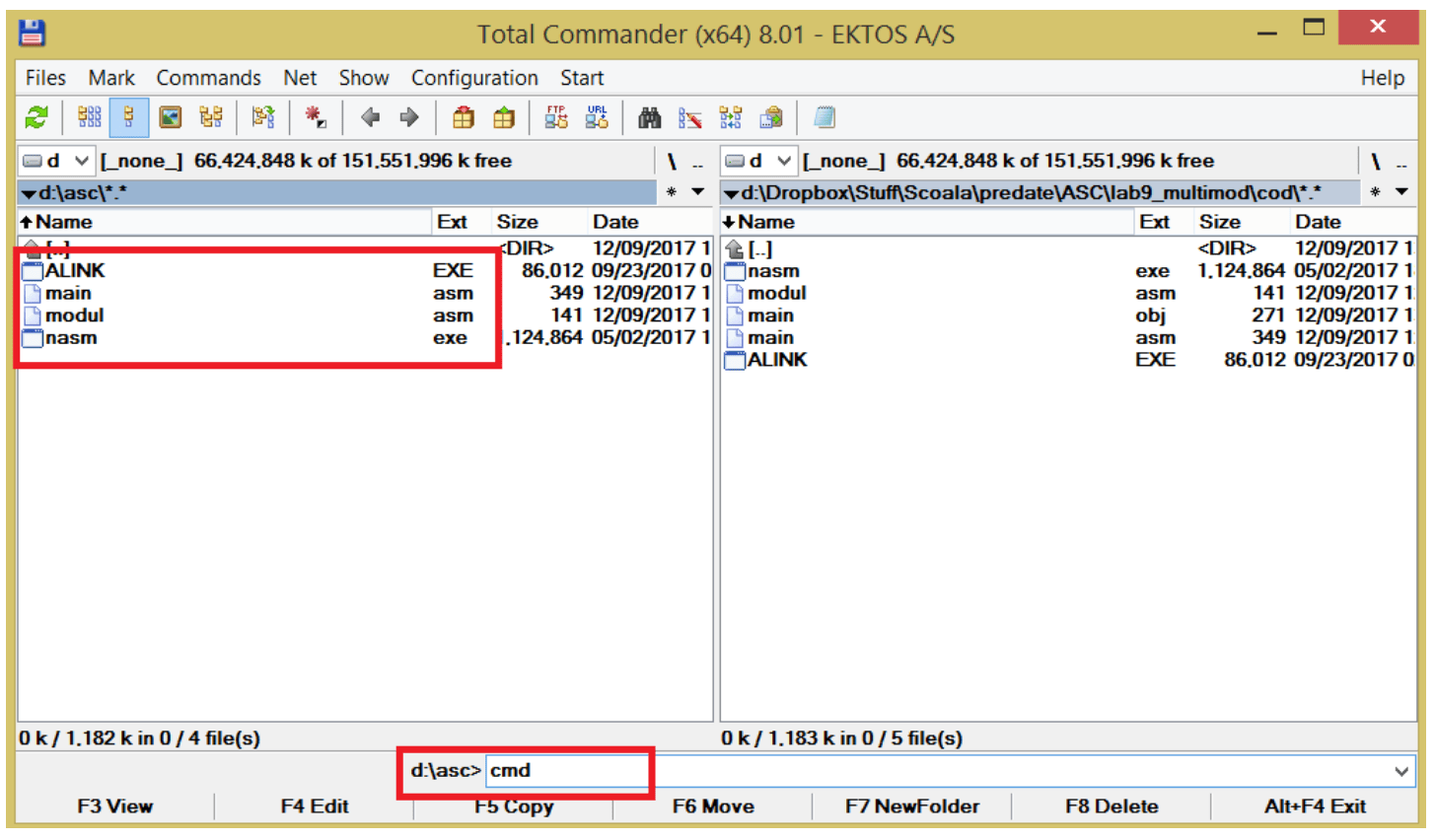
- For an easier way of browsing the command line to the location on the disk where sources are we can use Total Commander, we browse visually to the folder asc and launch the command line (see the image bellow)
- if you don’t want to use Total Commander, launch cmd.exe and with the following command lines browse the tree structure of your drive to the folder asc
> d:
> cd  asc
whatever the choice the result should be the one from the following image

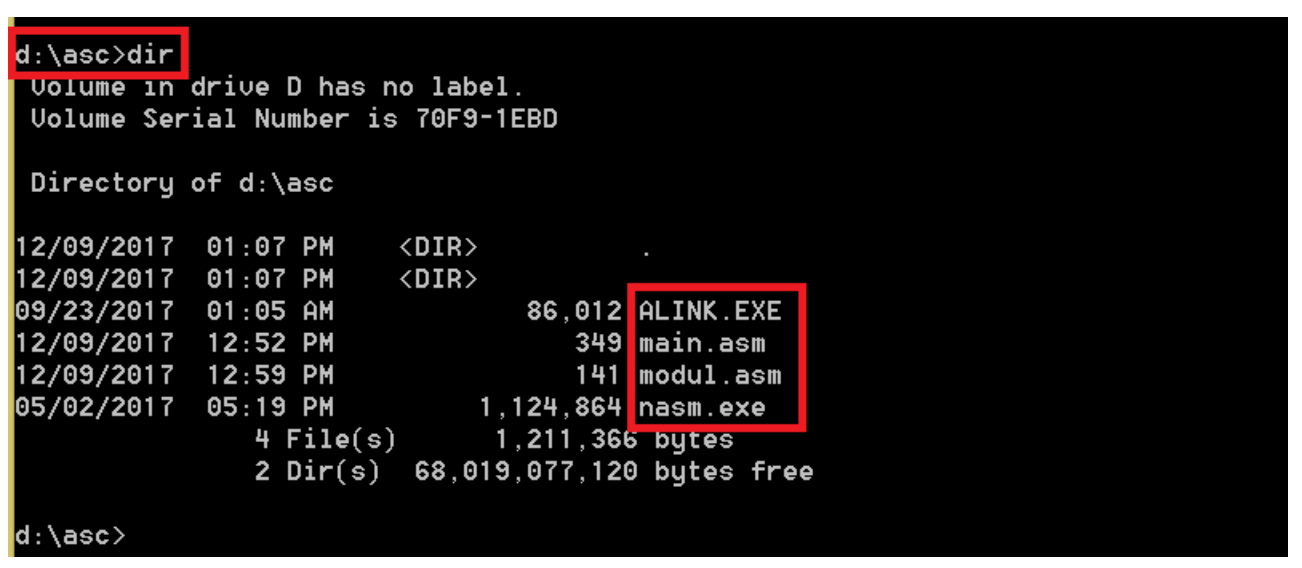
command dir shows the content of the current folder, we check if the current folder contains the sources *.asm and the programs alink.exe and nasm.exe (see the bellow image)
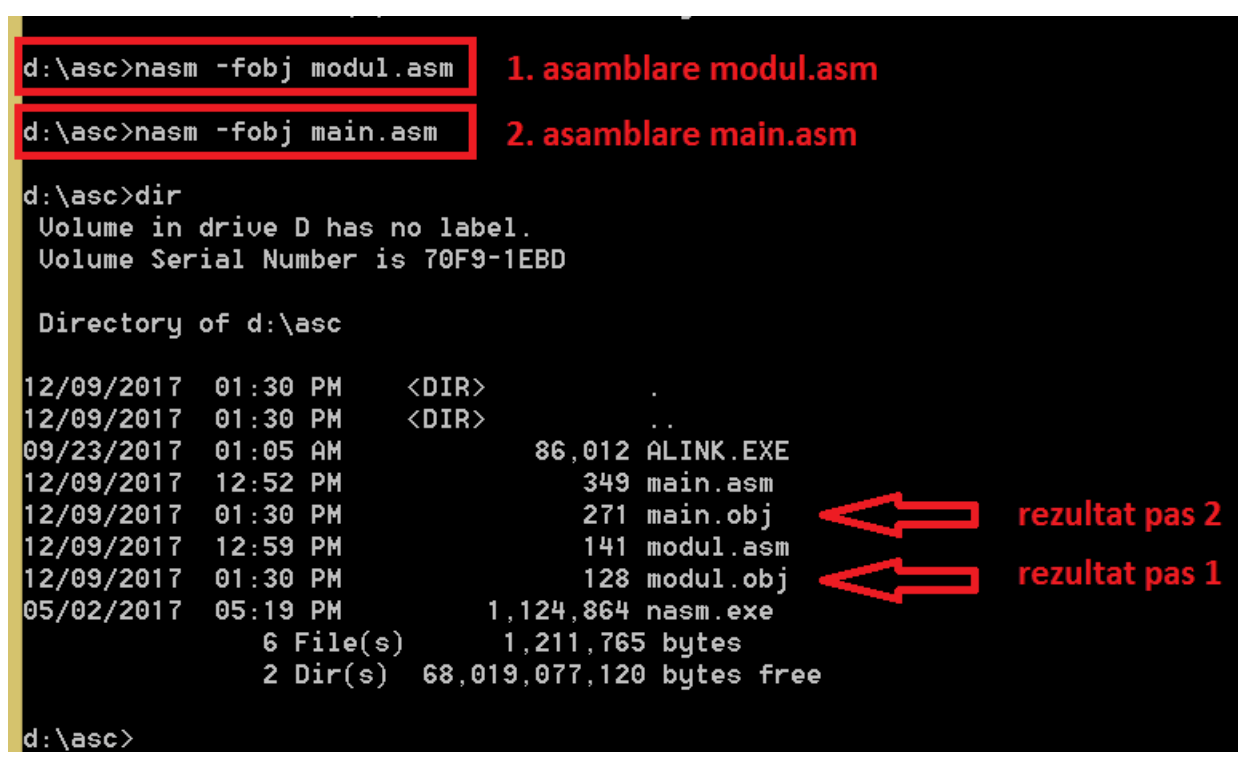
the two sources are assembled with the command lines
> nasm -fobj modul.asm
> nasm -fobj main.asm
the result is the one from the bellow image, two *.obj files
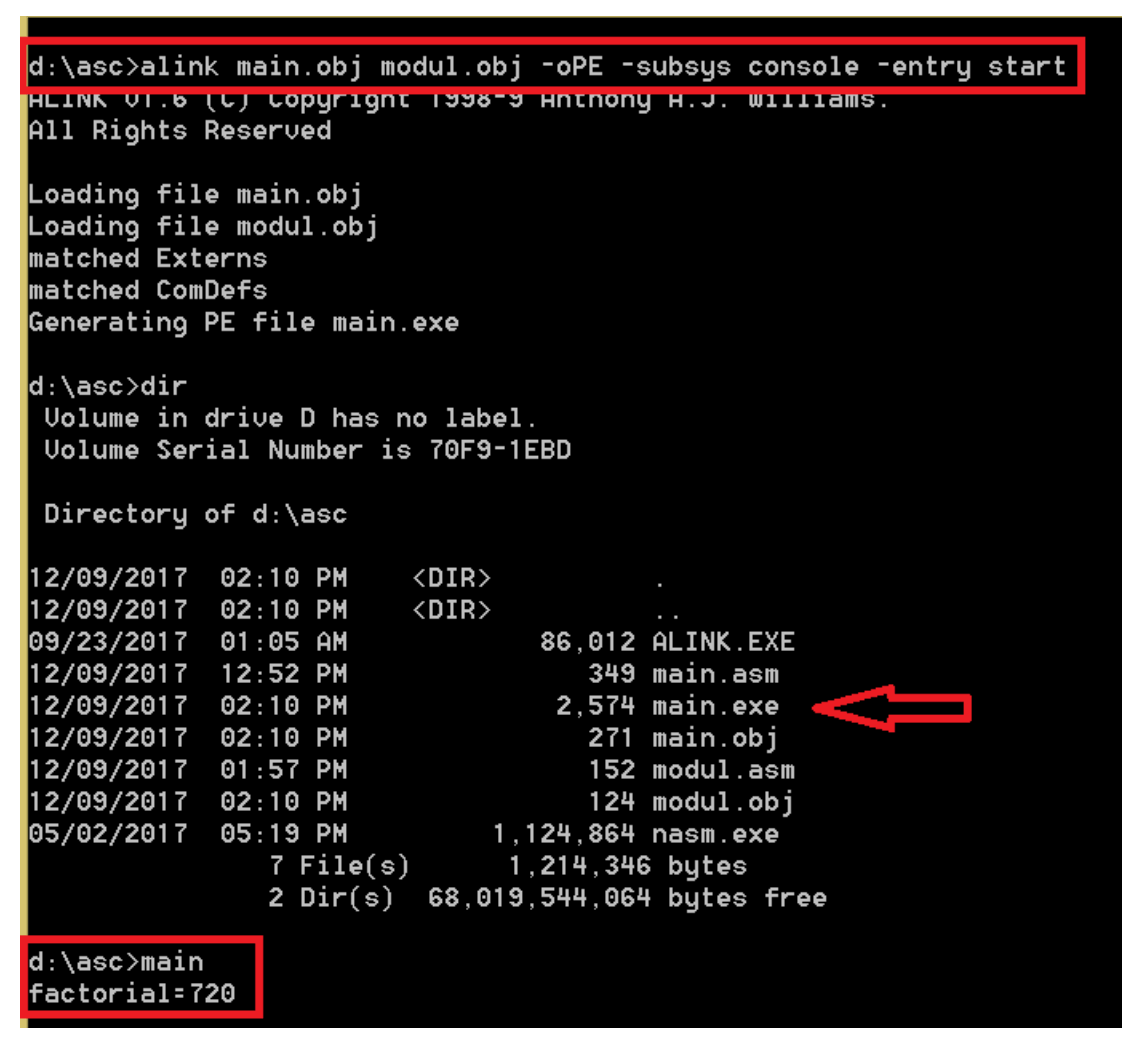
using alink.exe (link editor), from the two *.obj files an executable file will be created, the resulted exe filename is the same with the one of the first .obj file given as parameter to the link editor, in this case main. The prgram can be run, in this case main.exe writes to the console factorial = 720 (see the bellow image)
to debug the code, from ollydbg, File->Open and open the executable file, in this case main.exe.
Example 1: one file to compute factorial
; the program computes the factorial of a number and writes to the console the result
; the factorial function is defined in the code segment and received on the stack as the parameter a number
bits 32
global start

extern printf, exit
import printf msvcrt.dll
import exit msvcrt.dll

segment data use32 class=data
    format_string db "factorial=%d", 10, 13, 0

segment code use32 class=code
; the factorial function
factorial:
    mov eax, 1
    mov ecx, [esp + 4]
    ; mov ecx, [esp + 4] pop from the stack the fucntion parameters
    ; ATENTION!!! at the top of the stack it is the retun address
    ; the function's parameter is right after the return address
    ; see the following draw
    ;
    ; stack
    ;
    ;|--------------|
    ;|return address|  <- [esp]
    ;|--------------|
    ;|  00000006h   |  <- the function's parameter, [esp+4]
    ;|--------------|
    ; ....


    .repeat:
        mul ecx
    loop .repeat ; atention, the case ecx = 0 is not treated!

    ret

; the "main" program
start:
    push dword 6        ; save on the stack the number (the function's parameter)
    call factorial      ; call the function

       ; write the result
    push eax
    push format_string
    call [printf]
    add esp, 4*2

    push 0
    call [exit]
Example 2: one procedure in a different file - no need to compile different files
lab8_proc_main.asm
; the program computes the factorial of a number and writes to the console the result
; the function factorial is defined in the file factorial.asm
bits 32

global start

import printf msvcrt.dll
import exit msvcrt.dll
extern printf, exit

; the code defined in factorial.asm will be written here
%include "factorial.asm"

segment data use32 class=data
	format_string db "factorial=%d", 10, 13, 0


segment code use32 class=code
start:
	push dword 6
	call factorial

	push eax
	push format_string
	call [printf]
	add esp, 2*4

	push 0
	call [exit]
- and the procedure factorial defined in factorial.asm and included ifndef endif
%ifndef _FACTORIAL_ASM_ ; continue if _FACTORIAL_ASM_ is undefined
%define _FACTORIAL_ASM_ ; make sure that it is defined
                        ; otherwise, %include allows only one inclusion

;define the function
factorial: ; int _stdcall factorial(int n)
    mov eax, 1
    mov ecx, [esp + 4]

    repeat:
        mul ecx
    loop repeat ; atention, the case ecx = 0 is not treated!

    ret 4 ; in this case, 4 represents the number of bytes that need to be cleared from the stack (the parameter of the function)

%endif
Example 3: two module assembled separately
main.asm
bits 32
global start

import printf msvcrt.dll
import exit msvcrt.dll
extern printf, exit

extern factorial

segment data use32
	format_string db "factorial=%d", 10, 13, 0

segment code use32 public code
start:
	push dword 6
	call factorial

	push eax
	push format_string
	call [printf]
	add esp, 2*4

	push 0
	call [exit]
- second module modul.asm
bits 32
segment code use32 public code
global factorial

factorial:
	mov eax, 1
	mov ecx, [esp + 4]

	repeat:
		mul ecx
	loop repeat
	ret 4 ; in this case, 4 represents the number of bytes that need to be cleared from the stack (the parameter of the function)
Example 4: Recursive factorial
bits 32 ; assembling for the 32 bits architecture
; declare the EntryPoint (a label defining the very first instruction of the program)
global start

; declare external functions needed by our program
extern exit,printf,scanf; add the external functions that we need
import exit msvcrt.dll
import printf msvcrt.dll
import scanf msvcrt.dll

; our data is declared here (the variables needed by our program)
segment data use32 class=data
    ; ...
    text db "give n=",0
    final db "n!=%d",0
    format db "%d",0
    a resd 1                  ; the variable will store the number n read from the console


; our code starts here
segment code use32 class=code
    factor:
        ;to implement the problem recursively we need to break it in cases
        ;to compute the factorial we have two cases:
        ;n!=n*(n-1)!       - current iteration
        ;0!=1                  - stop condition
        ;the subprogram will repeat itsealf until ecx=0 when we make eax = 1 and return to the previous step
        mov ecx, [esp+4] ;move in ecx the number of steps that need to be done
        jecxz sf ;if ecx is 0 we jump to the label sf to start computing the factorial
        ;if we pass the comparison with 0 the we are at the first case of recursivity
        ;the formula is n!=n*(n-1)!
        dec ecx; decrease ecx to call again the function for the next step
        push ecx;  push on the stack the current value of n
        call factor; call the function with the current parameter with the value from the stack
        mul dword [esp+8]; multiply by the value of the current step
        add esp,4; free the stack to go back to the previous step
        jmp return; jump to the label return to step out from the subprogram

   sf:
        mov eax,1;because our recursivity has two cases we reached the case when ecx is 0 and return 1 – the stop condition
        ;0!=1
        return:
        ret ;we go back to the previous step or to the main program
   start:
        ; ...
        ;writting the message
        push dword text
        call [printf]
        add esp,4

        ;read n from the console
        push dword a
        push dword format
        call [scanf]
        add esp,4*2

        mov ecx,0
        mov eax,0;prepare the registers for the call
        push dword [a] ;save on the stack n
        call factor ;call the function

        ;writting the result
        push eax
        push final
        call [printf]
        ; exit(0)
        push dword 0; push the parameter for exit onto the stack
        call [exit]; call exit to terminate the program
Exercices
Multi-modul programming (asm+asm)
- For the next problems, at least one subprogram should be implemented in a separated module:
- An unsigned number a on 32 bits is given. Print the hexadecimal representation of a, but also the results of the circular permutations of its hex digits.
- Read from the keyboard a string of numbers, given in the base 10 as signed numbers (a string of characters is read from the keyboard and a string of numbers must be stored in the memory).
- Two strings containing characters are given. Calculate and display the result of the concatenation of all characters of type decimal number from the second string, and then followed by those from the first string, and vice versa, the result of concatenating the characters from the first string after those from the second string.
- A string of numbers is given. Show the values in base 16 and base 2.
- Read the signed numbers a, b and c on type byte; calculate and display a+b-c.
- Three strings (of characters) are read from the keyboard. Identify and display the result of their concatenation.
- Three strings (of characters) are given. Show the longest prefix for each of the three pairs of two strings that can be formed.
- Show for each number from 32 to 126 the value of the number (in base 8) and the character with that ASCII code.
- Read from the keyboard a string of numbers, given in the base 16 (a string of characters is read from the keyboard and a string of numbers must be stored in memory). Show the decimal value of the number both as unsigned and signed numbers.
- Multiple strings of characters are being read. Determine whether the first appears as a subsequence in each of the others and give an appropriate message.
- Multiple numbers in base 2 are read from the keyboard. Display these numbers in the base 16.
- Two strings of characters of equal length are given. Calculate and display the results of the interleaving of the letters, for the two possible interlaces (the letters of the first string in an even position, respectively the letters from the first string in an odd positions). Where no character exist in the source string, the ‘ ’ character will replace it in the destination string.
- Three strings of characters are given. Show the longest common suffix for each of the three pairs of two strings that can be formed
- Read an integer (positive number) n from keyboard. Then read n sentences containing at least n words (no validation needed).
Print the string containing the concatenation of the word i of the sentence i, for i=1,n (separated by a space).
Example: n=5
We read the following 5 sentences:
We read the following 5 sentences.
Today is monday and it is raining.
My favorite book is the one I just showed you.
It is pretty cold today.
Tomorrow I am going shopping.
The string printed on the screen should be:
We is book cold shopping. - A string containing n binary representations on 8 bits is given as a character string.
Obtain the string containing the numbers corresponding to the given binary representations.
Example:
Given: '10100111b', '01100011b', '110b', '101011b'
Obtain: 10100111b, 01100011b, 110b, 101011b - Read a string of unsigned numbers in base 10 from keyboard. Determine the maximum value of the string and write it in the file max.txt (it will be created) in 16 base.
- Read a string of unsigned numbers in base 10 from keyboard. Determine the minimum value of the string and write it in the file min.txt (it will be created) in 16 base.
- Read from file numbers.txt a string of numbers (positive and negative). Build two strings using readen numbers:
P – only with positive numbers
N – only with negative numbers
Display the strings on the screen. - Read from file numbers.txt a string of numbers. Build a string D wich contains the readen numbers doubled and in reverse order that they were read. Display the string on the screen.
Ex: s: 12, 2, 4, 5, 0, 7 => 14, 0, 10, 8, 4, 24 - Read from the console a list of numbers in base 10. Write to the console only the prime numbers.
- It is given a number in base 2 represented on 32 bits. Write to the console the number in base 16. (use the quick conversion)
- Read a string of integers s1 (represented on doublewords) in base 10. Determine and display the string s2 composed by the digits in the hundreds place of each integer in the string s1.
Example: The string s1: 5892, 456, 33, 7, 245
The string s2: 8, 4, 0, 0, 2 - Read a string s1 (which contains only lowercase letters). Using an alphabet (defined in the data segment), determine and display the string s2 obtained by substitution of each letter of the string s1 with the corresponding letter in the given alphabet.
Example:
The alphabet: OPQRSTUVWXYZABCDEFGHIJKLMN
The string s1: anaaremere
The string s2: OBOOFSASFS - Read a string of signed numbers in base 10 from keyboard. Determine the maximum value of the string and write it in the file max.txt (it will be created) in 16 base.
- Read a string of signed numbers in base 10 from keyboard. Determine the minimum value of the string and write it in the file min.txt (it will be created) in 16 base.
- Read from file numbers.txt a string of numbers (odd and even). Build two strings using readen numbers:
P – only with even numbers
N – only with odd numbers
Display the strings on the screen. - Read a sentence from the keyboard containing different characters (lowercase letters, big letters, numbers, special ones, etc). Obtain a new string with only the small case letters and another string with only the big case letters. Print both strings on the screen.
- Read a sentence from the keyboard. Count the letters from each word and print the numbers on the screen.
- Read a sentence from the keyboard. For each word, obtain a new one by taking the letters in reverse order and print each new word.
Remarks:
- Is given means that the data can be put directly into the data segment; read means that the data must be read from the keyboard.
- Unless otherwise specified, numbers are considered to be represented on 32-bit unsigned bits, and character strings up to 100 characters (the string itself).